01 / Observed attention
Measure the active window
The default model records which platform window receives focus and how long that focus lasts. The signal stays narrow, legible, and easy to reset.
Brainrot Feedback / Windows intervention / critical interface
A desktop intervention that makes a recommender loop visible by turning focus time, inferred preference, and window prominence into one readable system.
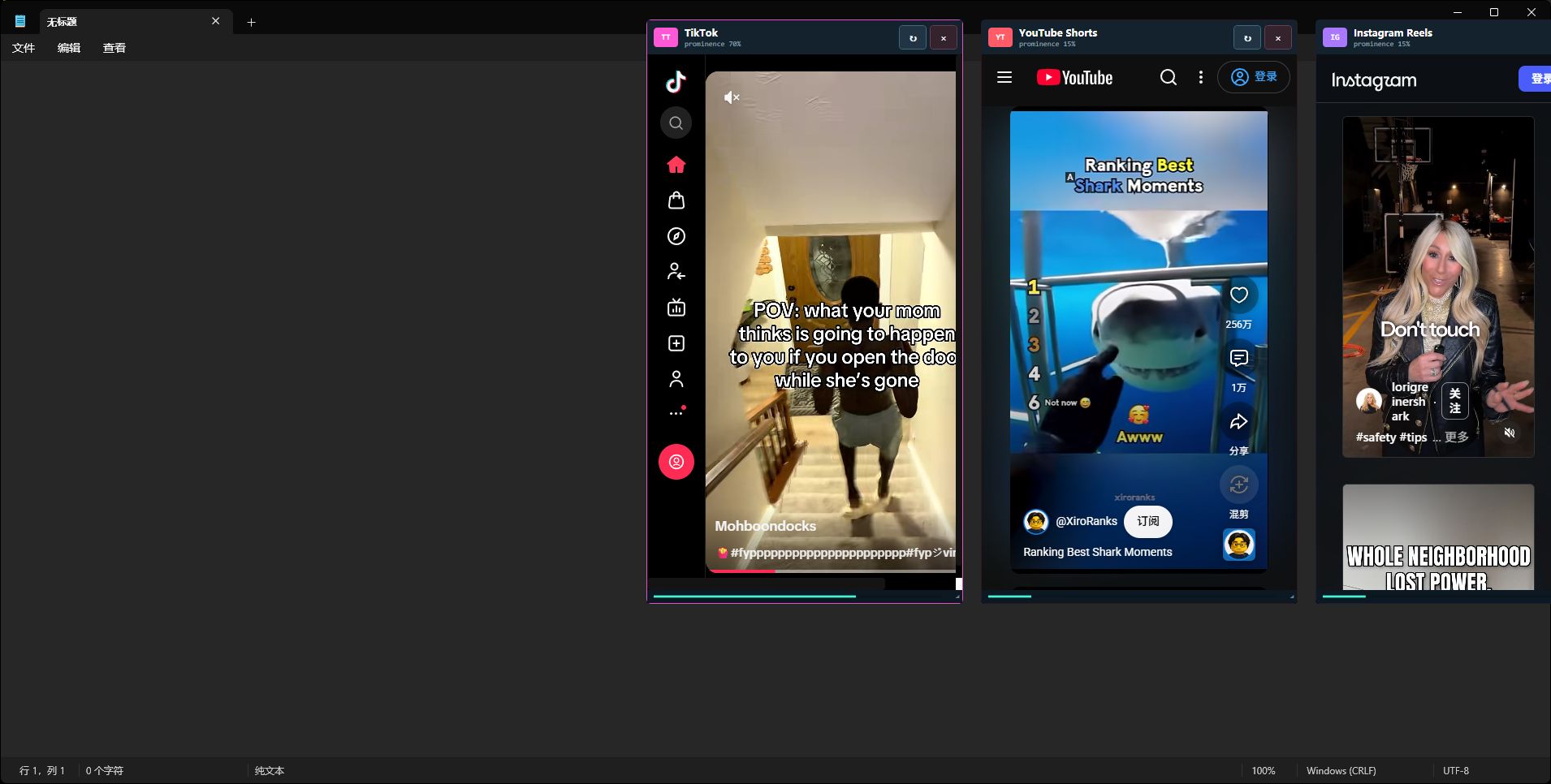
Three resizable WebView2 feeds sit beside a click-through audit layer, direct controls, and an optional diversity intervention. The default model uses window focus as its signal and keeps every transformation visible to the user.
Design problem
Short-form platforms usually hide the path from attention to recommendation. This project separates the loop into readable stages so the user can see what the model observed, what it inferred, and how that estimate changes the next exposure.
01 / Observed attention
The default model records which platform window receives focus and how long that focus lasts. The signal stays narrow, legible, and easy to reset.
02 / Inferred preference
Focus events become a visible preference estimate. The interface presents that estimate as model output, keeping it separate from a person's identity, intent, or true interest.
03 / Exposure gate
Adaptive priority can lift a weighted platform window above the others. The recommendation becomes physical window prominence, making the next exposure easier to notice and critique.
System loop
A two-minute diversity intervention can route the same recorded signals through a different exposure policy.
Interaction architecture
04 / Feed windows
TikTok, YouTube Shorts, and Instagram Reels run in separate phone-shaped WebView2 windows. They share one app-owned browser environment so sessions remain coordinated without storing plaintext credentials.
05 / Audit layer
A topmost click-through layer visualizes the loop while the compact control strip restores feeds, opens settings, and reports the current watched share and prominence.
06 / User intervention
The user can toggle click-through behavior, change monitor placement, adjust media volume, reset the model, and start a bounded diversity intervention from the same settings surface.
Live software capture
The control strip compresses the system into one glance: current attention share, model prominence, and the actions needed to restore or reconfigure the feed windows.

Capture notes
The feed windows remain draggable and resizable because the desktop is the interaction space. The intervention follows the user across ordinary work instead of containing the critique inside a separate dashboard.
The three platform frames in the hero are the running application, captured through Windows Graphics Capture.
Privacy boundary
With Content Detail disabled, the application observes WPF window activation only. It does not inspect documents, URLs, window text, screens, messages, comments, or browsing history.
When the user enables it, an in-page observer waits for five seconds of visible active playback, matches nearby title or caption text against a bounded issue glossary, stores aggregate topic counts, and discards the raw text. Counts and prompts can be reset or disabled at any time.
Build details
The desktop application uses .NET 8, WPF, Win32 window coordination, and Microsoft Edge WebView2. A shared app-owned WebView2 profile keeps the three platform windows in one session while coordinated shutdown contains every process the application started.
The project includes per-monitor placement, resizable feeds, a draggable settings icon, a global F8 click-through toggle, startup monitoring for a user-selected allowlist of productivity applications, local diagnostics, and a self-contained Windows x64 package.
Public release / itch.io
The itch.io release for Brainrot Feedback is available under its public title, ADHD Worsener.